The London SME Landscape in 2026
London SMEs are operating in a far more complex IT and security environment than they were even a few years ago. This guide is written for small and medium‑sized businesses that want practical, vendor‑agnostic advice on how to stay secure, productive and cost‑efficient in 2026.
Budgets are tighter, cyber threats are more frequent, and change is being driven by cloud services, AI and automation. The role of IT support has shifted, it’s no longer just about fixing issues, but about reducing risk, keeping costs predictable and supporting the way people actually work today.
Key IT support London Priorities for London SMEs in 2026
Most SMEs don’t need the latest shiny technology, they need the basics done well, consistently. In 2026, the organisations that stay secure and productive are the ones that focus on strong foundations rather than quick fixes.
The most common priorities we see across London SMEs are:
- Identity‑first security
- Disciplined patching and asset management
- Reliable backup and recovery
- Endpoint protection with monitoring (realtime)
- Network segmentation and secure access
- Clear service levels and accountability
Hybrid working is now standard, SaaS estates keep growing, and attackers are increasingly targeting SMEs using phishing, MFA fatigue and supply‑chain attacks. These priorities exist to address those realities.
What Is MFA Fatigue?
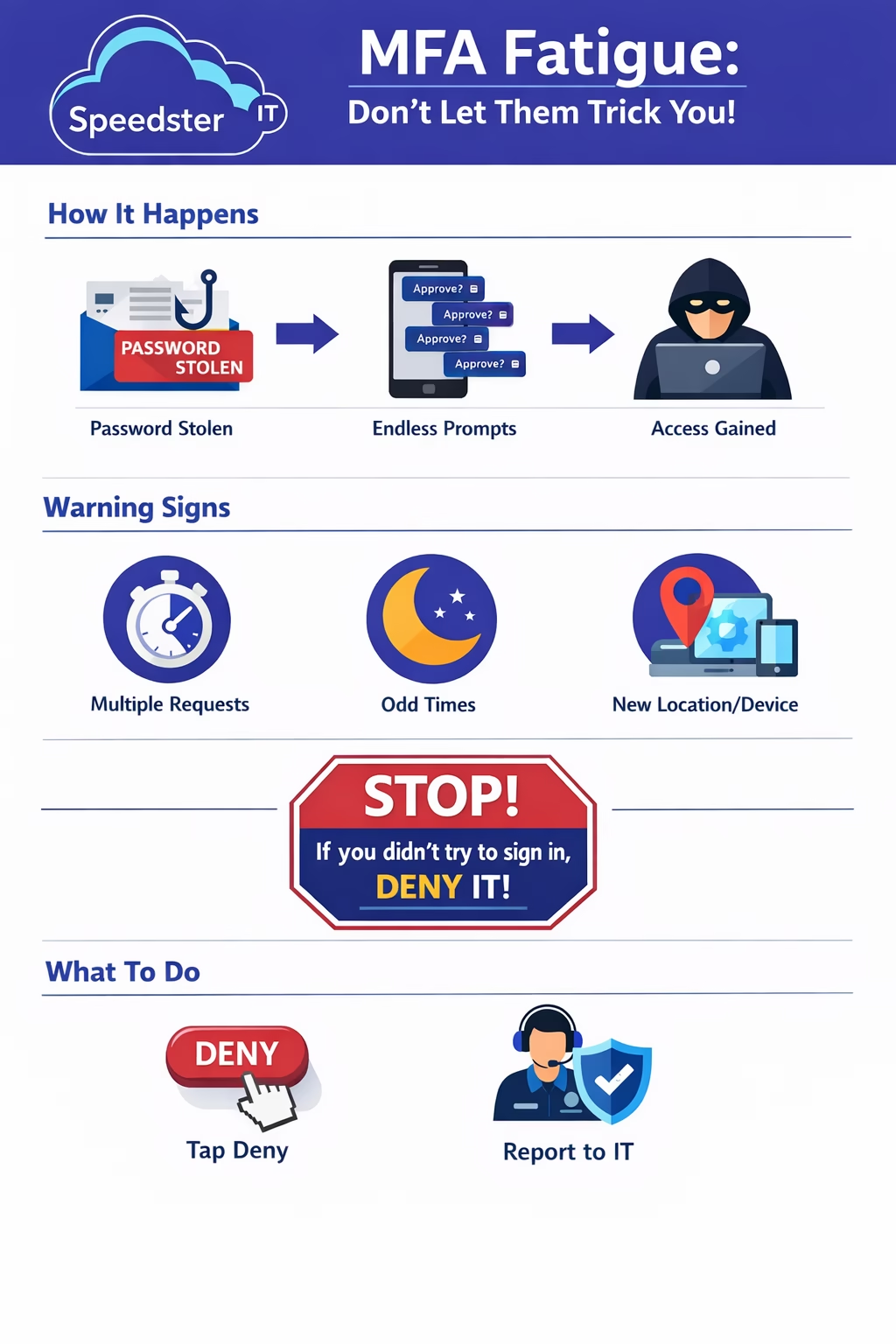
MFA fatigue (sometimes called push fatigue) is a social‑engineering attack that targets people rather than technology. Instead of trying to bypass multi‑factor authentication, attackers attempt to trick users into approving a sign‑in request themselves.
This is usually done by sending repeated “Approve sign‑in?” notifications until the user accidentally taps approve, often because they’re busy, distracted, or think something is broken.
How MFA Fatigue Attacks Happen
MFA fatigue attacks are simple, but effective. They rely on persistence and confusion rather than technical sophistication.
A typical attack looks like this:
- An attacker obtains a password (often via phishing or a data breach).
- They attempt to sign in, triggering MFA prompts.
- The user receives repeated approve/deny notifications.
- One approval is made by mistake.
- The attacker gains access and may escalate privileges or persist access.
Once inside a Microsoft 365 account, attackers often move quickly.
Why SMEs Are Commonly Targeted by MFA Fatigue
SMEs are particularly vulnerable because identity controls are often inconsistent or poorly explained to staff. Users may not realise that an unexpected MFA prompt is a warning sign, not an inconvenience.
Push‑based MFA is also very easy to approve, and many businesses haven’t enabled safer options such as number matching or phishing‑resistant methods. A single compromised account can provide access to email, Teams, SharePoint and OneDrive, making MFA fatigue a high‑impact attack for smaller organisations.
How to Reduce the Risk of MFA Fatigue
Reducing the risk of MFA fatigue doesn’t require complex tools, it requires better configuration and clearer rules.
Practical steps include:
- Using number matching instead of one‑tap approvals
- Enforcing phishing‑resistant MFA for admin accounts
- Using Conditional Access to reduce unnecessary prompts
- Making it policy that unexpected MFA prompts must be denied and reported
The goal is to make MFA prompts meaningful and rare, not constant background noise.
Download our Office Trainging Guide on how to Reduce the Risk of MFA Fatigue
IT Support London Cost Pressures and Compliance in 2026
Technology costs are becoming harder to predict. Hardware pricing, particularly for RAM, SSDs and GPUs remains volatile due to AI demand, while software subscriptions continue to increase.
At the same time, compliance expectations such as Cyber Essentials are rising, and customers expect near‑constant availability. Downtime, security incidents and poor recovery are less tolerated than ever, even for smaller organisations.
What to Expect From an IT support London Partner in London
In 2026, IT support should be proactive, security‑led and transparent. Fixing issues when they break is no longer enough.
A good IT support partner should keep systems stable day‑to‑day, reduce security risk as standard, and give you clear visibility of what’s being done and why. Reporting should be in plain English, SLAs should be clear, and ownership of issues should never be ambiguous.
Most importantly, security should be built in, protecting identities, email, endpoints and backups by default.
Core Capabilities to Look For When Comparing IT Support London Providers
When comparing IT support providers, look for evidence of the following capabilities:
- Proactive monitoring and patching across endpoints, servers and cloud apps
- Microsoft 365 hardening (MFA, Conditional Access, Secure Score improvement)
- Email and identity protection (anti‑phishing, DKIM, SPF, DMARC)
- Backup and disaster recovery with immutable offsite copies
- Network security (next‑gen firewalls, segmentation, secure remote access)
- EDR/XDR with active alerting and response
- Asset, licence and lifecycle management
- Clear SLAs, onsite London support and transparent reporting
The 2026 Security Baseline for UK SMBs
Every SME should meet a minimum security baseline. This isn’t about being perfect — it’s about removing easy wins for attackers.
That baseline includes:
- MFA for all users and admins
- Least‑privilege access with controlled admin elevation
- Encrypted, patched and compliant devices
- Strong email security controls
- Backups tested quarterly with documented recovery targets
- A basic incident response plan
- Cyber Essentials readiness
Microsoft 365: Practical Hardening Steps
Microsoft 365 is central to most SMEs, which makes it a common attack target. Hardening it properly can dramatically reduce risk.
Key steps include enforcing MFA and Conditional Access, disabling legacy authentication, restricting third‑party app access, tightening SharePoint and OneDrive sharing, enabling Defender for Office 365, and reviewing Secure Score regularly.
Business Continuity & Disaster Recovery (BCDR)
Backups only matter if they restore. Every SME should know which systems are critical, how quickly they need to recover, and how data would be restored in a real incident.
This means documenting RTO and RPO, testing restores regularly, and protecting Microsoft 365, SaaS, cloud and on‑prem systems equally, ideally using immutable backups alongside local recovery options.
IT Support London Costs, ROI and Planning for 2026
Predictability matters more than ever. Many SMEs are moving away from break‑fix support towards, unlimited IT support London and fixed‑fee managed services to control costs.
Common best practices include refreshing endpoints every 3–4 years, reviewing Microsoft 365 licences regularly, and using asset data to plan upgrades around pricing volatility rather than reacting at the last minute.
How Speedster IT Helps London SMEs
Speedster IT supports London SMEs with a security‑led, practical approach to IT.
This includes local onsite support, Microsoft 365 security roadmaps, managed WatchGuard firewalls, Cyber Essentials preparation, managed detection and response, backup testing, clear SLAs and a named account manager.
Quick IT Support London Checklist for Decision‑Makers
If you’re reviewing your IT setup, these questions are a good starting point:
- Do we enforce MFA and Conditional Access everywhere?
- Are backups immutable and tested quarterly?
- Is Microsoft Secure Score improving month‑to‑month?
- Are endpoints patched and protected within 14 days?
- Do we meet Cyber Essentials today?
- Do we have an incident response plan?
- Are Staff up to speed on Cyber Security Training for Employees
If you want clarity on where your business stands in 2026, speak to Speedster IT, IT Support London for UK SMEs.
📞 020 3011 1234
With over 15 years at Speedster IT, I’ve built a career around helping businesses navigate the evolving world of technology. I publish all the content for the IT Support London Blog and Cyber Security Blog, where I share practical insights on infrastructure upgrades, cybersecurity trends, and smart IT strategies for growing companies.